Carrier setup guide
Mobile Call Shield screens unknown and potential scam calls before they reach you. Your approved family and friends bypass screening and ring your personal phone line as normal.
Your phone rings first. You set up conditional call forwarding with your mobile carrier. Calls only go to Mobile Call Shield when you don't answer, your line is busy, or your phone is turned off.
It is on your phone, next to your other apps.
Your assigned 10-digit Mobile Call Shield Forwarding Number is on the Call Forwarding Setup screen and the Shield Settings screen.
Check the table and the network notes below to see which format your carrier uses.
Use the standard Phone app, not a messaging app.
Replace the Shield number placeholder with your assigned number. For GSM carriers, remember the leading 1.
You will hear a confirmation tone or see a success message on your screen.
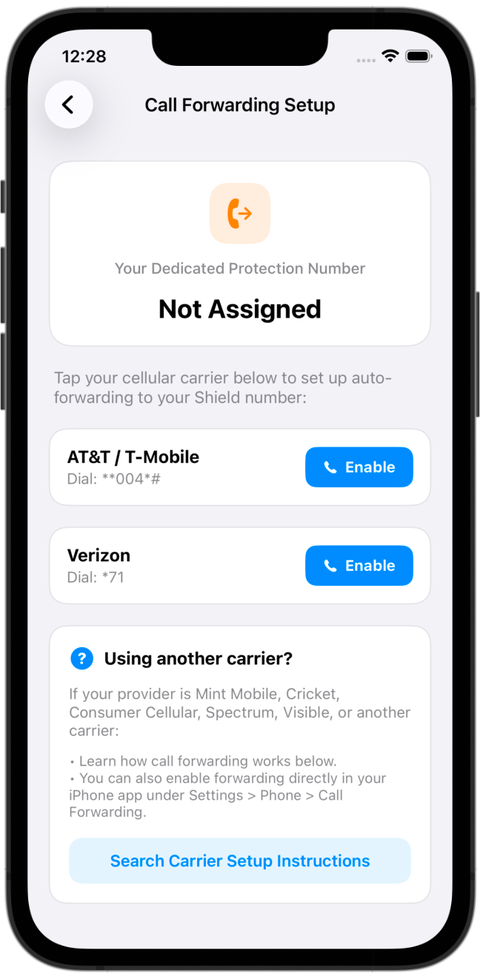
At the top, the screen shows your assigned protection number, or tells you if it is still being assigned. Below it are one-tap buttons for the major carriers. If your carrier is not listed, the screen explains prepaid and smaller carriers and has a Search Carrier Setup Instructions button.
Turn on conditional forwarding (no answer, busy and phone off) or turn off call forwarding. Where you see "your Shield number," use your assigned 10-digit Forwarding Number.
| Carrier / network | Turn onNo answer, busy and phone off | Turn off |
|---|---|---|
| Verizon Wireless CDMA / LTE | *71 + your Shield number | *73 |
| AT&T GSM | **004*1 + your Shield number + # | ##004# |
| T-Mobile GSM | **004*1 + your Shield number + # | ##004# |
Many budget and prepaid providers run on a major network. Use the format for the network yours runs on.
Mint Mobile, Consumer Cellular, Tello, Red Pocket (AT&T/T-Mobile SIM), Cricket Wireless, Ultra Mobile, Google Fi, Boost Mobile, or any other provider on a GSM network.
Turn on with **004*1 + number + #. Turn off with ##004#.
Total by Verizon, Straight Talk, Walmart Family Mobile, Xfinity Mobile, Spectrum Mobile, Visible, TracFone (Verizon SIM), Page Plus, or any other provider on the Verizon network.
Turn on with *71 + number. Turn off with *73.
Total, Straight Talk, Walmart Family, Xfinity, Spectrum. The *71 code bundles no answer, line busy and unreachable into one code, using Verizon's standard ring timing. Verizon lines do not support a custom delay or separate sub-codes.
If your number is 877-521-7775, dial:
*718775217775To turn off, dial *73 and press Call.
AT&T, T-Mobile, Mint, Consumer Cellular, Tello, Red Pocket. The **004*1 shortcut forwards calls when your line is busy, unanswered or turned off.
If your number is 877-521-7775, dial:
**004*18775217775#To turn off, dial ##004# and press Call.
On AT&T, T-Mobile or another GSM network, your phone usually rings 15 to 20 seconds before forwarding starts. To choose the delay yourself (15, 20, 25 or 30 seconds), use the No Answer code instead.
Turn on with a 20-second delay:
**61*1 + your Shield number + *11*20#Turn off: dial ##61#.
Verizon does not have these options. This feature is only for GSM carriers.
No. Conditional call forwarding lets your phone ring normally first. If a caller is in your trusted contact list, you answer the call as usual. Calls only go to Mobile Call Shield if you don't answer, decline the call, are on another line, or have your phone turned off.
Dial the turn-off code for your network at any time: *73 for Verizon networks, or ##004# for GSM networks. Your phone goes straight back to standard carrier calling.